Molmo2 is a multimodal LLM from AI2 (Allen Institute) with fully open-sourced code, weights, and training data
We fine-tune it on our SLEAP mouse home cage VQA dataset using LoRA
This notebook is designed to run in Google Colab with a GPU runtime
┌──────────────────────┬──────────────────────┬──────────────────────────────────────────┬────────────────────────────────┐
│                      │        LLaVA         │                PaliGemma                 │             Molmo2             │
├──────────────────────┼──────────────────────┼──────────────────────────────────────────┼────────────────────────────────┤
│ Vision encoder       │ CLIP ViT             │ SigLIP ViT                               │ CLIP ViT (DFN)                 │
│ LLM backbone         │ Vicuna/LLaMA         │ Gemma                                    │ OLMo2                          │
│ Projection           │ Linear/MLP           │ Linear                                   │ MLP with multi-scale crops     │
│ Training stages      │ 2 (align → instruct) │ 3 (unimodal → multimodal → task)         │ 2 (multimodal pretrain → SFT)  │
│ Special capabilities │ General VQA          │ Detection, segmentation (loc/seg tokens) │ Pointing, tracking, video      │
│ Openness             │ Weights + code       │ Weights + code                           │ Weights + code + training data │
│ Released by          │ UW Madison           │ Google                                   │ AI2 (Allen Institute)          │
└──────────────────────┴──────────────────────┴──────────────────────────────────────────┴────────────────────────────────┘
I was actually impressed at how good Molmo2 was out of the box on these images. Their previous version had a very difficult time even telling what was in the image, but this one is much sharper. Still, as a learning experience (and this is probably something that would actually need to be done to use this model for real scientific research), let’s fine tune to get exactly the answers we want to help ground pose, location, and better description of the images.
┌──────────────────────────┬────────────────────────────┬────────────────────────────────────────────────────────────────────┐
│         Question         │       Generic answer       │                       Domain-precise answer                        │
├──────────────────────────┼────────────────────────────┼────────────────────────────────────────────────────────────────────┤
│ "How many mice and       │ "Two mice, one top one     │ "2 mice. The mouse on the left at (640, 320), the mouse on the    │
│ where?"                  │ bottom"                    │ right at (400, 800)"                                               │
├──────────────────────────┼────────────────────────────┼────────────────────────────────────────────────────────────────────┤
│ "What body parts are     │ "Part of the mouse is      │ "Left ear and tail tip of the mouse on the left are occluded"     │
│ occluded?"               │ hidden"                    │                                                                    │
├──────────────────────────┼────────────────────────────┼────────────────────────────────────────────────────────────────────┤
│ "Estimate the            │ Can't do this              │ "Snout-to-snout distance is approximately 150px. They are at      │
│ inter-mouse distance"    │                            │ moderate distance."                                                │
└──────────────────────────┴────────────────────────────┴────────────────────────────────────────────────────────────────────┘
Molmo2 Details
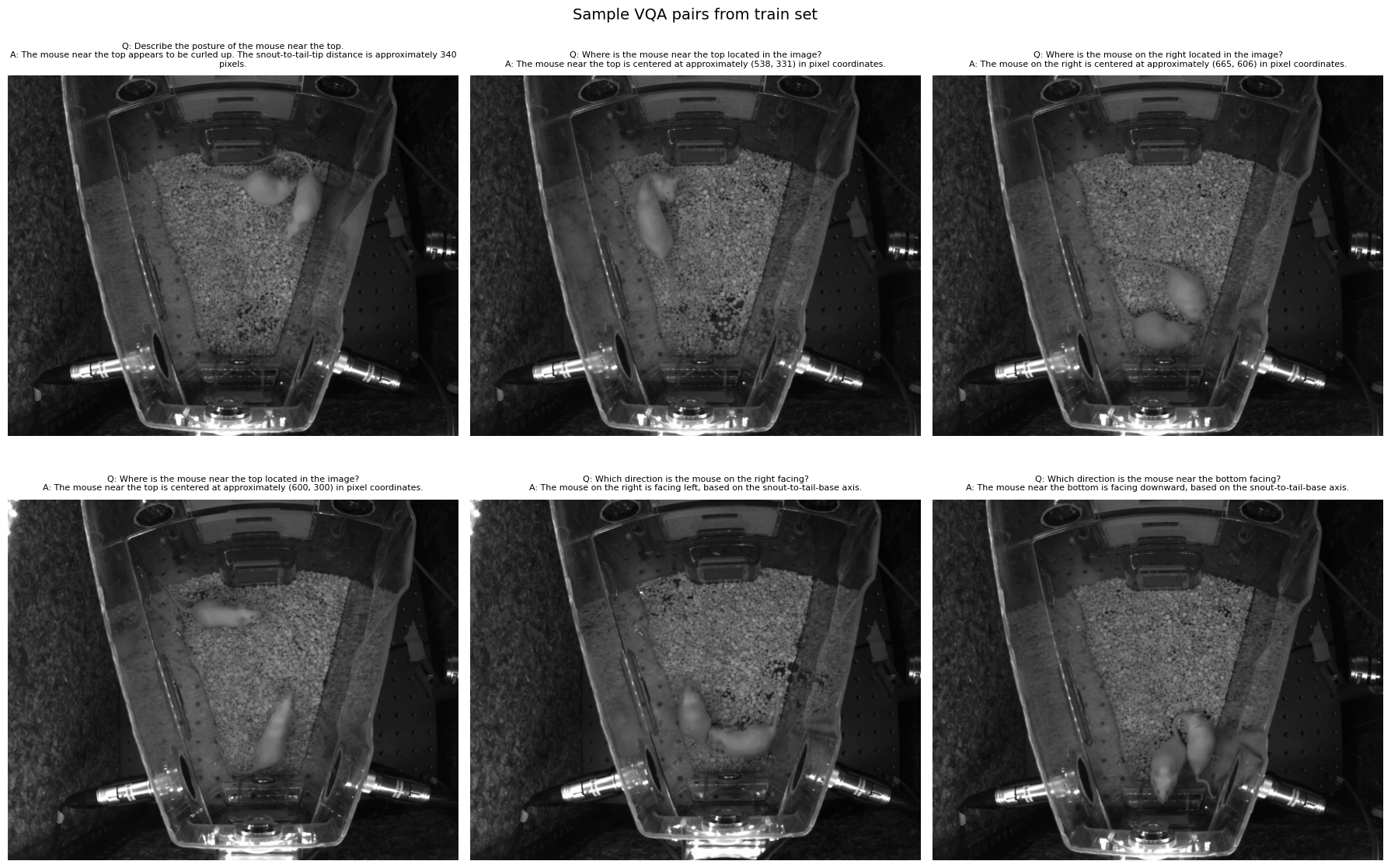
lets inspect the VQA dataset we created.
import jsonimport matplotlib.pyplot as pltfrom PIL import Imageimport random# Load from saved JSONwithopen("../data/vqa/train.json") as f: train_data = json.load(f)withopen("../data/vqa/val.json") as f: val_data = json.load(f)print(f"Train: {len(train_data)} QA pairs")print(f"Val: {len(val_data)} QA pairs")# Show random samples with their imagesrandom.seed(1023)samples = random.sample(train_data, 6)fig, axes = plt.subplots(2, 3, figsize=(18, 12))for ax, sample inzip(axes.flat, samples): old_dir = sample["image"] new_dir =f"../{old_dir}" img = Image.open(new_dir)print(sample["image"]) ax.imshow(img, cmap="gray")# Wrap the Q/A text for display q = sample["question"] a = sample["answer"] ax.set_title(f"Q: {q}\nA: {a}", fontsize=8, wrap=True, pad=10) ax.axis("off")plt.suptitle("Sample VQA pairs from train set", fontsize=14)plt.tight_layout()plt.show()
from huggingface_hub import login, snapshot_downloadfrom google.colab import userdatalogin(token=userdata.get('HF_TOKEN'), add_to_git_credential=True)snapshot_download("jpoberhauser/sleap-mice-vqa", repo_type="dataset", local_dir="data")# Unzip frames if they were uploaded as a zipimport osif os.path.exists("data/frames.zip") andnot os.path.exists("data/frames/frame_0000.png"):!unzip -q data/frames.zip-d data/print("Frames unzipped.")else:print("Frames already available.")
Colab Cell 3: Load model in float32
We load in float32 to avoid CUBLAS dtype errors during training. With 98GB VRAM this is fine (~16GB for the 4B model).
from PIL import Imageimg = Image.open("data/frames/frame_0000.png").convert("RGB")messages = [ {"role": "user","content": [dict(type="image", image=img),dict(type="text", text="How many mice are in this image? Describe their positions and postures."), ], }]inputs = processor.apply_chat_template( messages, tokenize=True, add_generation_prompt=True, return_tensors="pt", return_dict=True,)inputs = {k: v.to(model.device) for k, v in inputs.items()}with torch.inference_mode(): output = model.generate(**inputs, max_new_tokens=256)generated_tokens = output[0, inputs["input_ids"].size(1):]print("Base model response:")print(processor.tokenizer.decode(generated_tokens, skip_special_tokens=True))
Colab Cell 5: Attach LoRA adapters
LoRA freezes the base model and injects small trainable matrices. We target: - att_proj — fused Q/K/V projection (where the model decides what to attend to) - attn_out — output projection W_O (how attention results mix back in) - ff_proj — feed-forward layer (helps learn domain vocabulary)
from peft import LoraConfig, get_peft_model# Freeze the vision encoder — we only want to fine-tune the language modelfor param in model.model.vision_backbone.parameters(): param.requires_grad =Falselora_config = LoraConfig( r=16, lora_alpha=32, lora_dropout=0.0, target_modules=["att_proj", "attn_out", "ff_proj"], bias="none", task_type="CAUSAL_LM",)model = get_peft_model(model, lora_config)# Forward hook to enable gradients through frozen layers.# We need to find the correct path to the first transformer block.def make_inputs_require_grad(module, input, output):ifisinstance(output, tuple): output[0].requires_grad_(True)else: output.requires_grad_(True)# Find and hook the first transformer block (path varies by how model is wrapped)hooked =Falsefor name, module in model.named_modules():if name.endswith("blocks.0") and"vision"notin name: module.register_forward_hook(make_inputs_require_grad)print(f"Gradient hook attached to: {name}") hooked =Truebreakifnot hooked:print("WARNING: Could not find transformer blocks. Listing candidates:")for name, module in model.named_modules():if"blocks.0"in name:print(f" {name}")model.print_trainable_parameters()
### Colab Cell 6: Format VQA data and create datasets
### Colab Cell 7: Define collator and training config
from PIL import Imagedef collate_fn(examples):"""Custom collator — processes one example at a time. Molmo2's multi-crop image handling requires batch_size=1.""" ex = examples[0] # single example per batch# Build messages with lazily loaded images messages = []for msg in ex["messages"]: new_content = []for content in msg["content"]:if content["type"] =="image": img = Image.open(content["image"]).convert("RGB") new_content.append({"type": "image", "image": img})else: new_content.append(content) messages.append({"role": msg["role"], "content": new_content})# Process through apply_chat_template batch = processor.apply_chat_template( messages, add_generation_prompt=False, tokenize=True, return_tensors="pt", return_dict=True, )# Create labels — mask tokens the model shouldn't predict:# 1. Padding tokens# 2. Image/special tokens that are >= vocab_size (handled internally, not by the LM head) labels = batch["input_ids"].clone() vocab_size = processor.tokenizer.vocab_sizeif processor.tokenizer.pad_token_id isnotNone: labels[labels == processor.tokenizer.pad_token_id] =-100 labels[labels >= vocab_size] =-100# mask image patch tokens and other special tokens batch["labels"] = labelsreturn batch# Quick testtest_batch = collate_fn([train_formatted[0]])print(f"Input IDs shape: {test_batch['input_ids'].shape}")print(f"Keys: {list(test_batch.keys())}")# Verify no out-of-range labelslabels = test_batch["labels"]valid_labels = labels[labels !=-100]vocab_size = processor.tokenizer.vocab_sizeprint(f"Valid label range: {valid_labels.min()} to {valid_labels.max()}")print(f"Any labels >= vocab_size? {(valid_labels >= vocab_size).any()}")print(f"Tokens masked as -100: {(labels ==-100).sum().item()} out of {labels.numel()}")
from transformers import TrainingArguments, Trainertraining_args = TrainingArguments( output_dir="./molmo2-mice-lora", num_train_epochs=3, per_device_train_batch_size=1, # must be 1 for Molmo2's multi-crop images per_device_eval_batch_size=1, gradient_accumulation_steps=8, # effective batch size = 8 learning_rate=2e-4, lr_scheduler_type="cosine", warmup_ratio=0.1, logging_steps=10, eval_strategy="steps", eval_steps=200, save_strategy="steps", save_steps=200, save_total_limit=3, fp16=False, # no mixed precision — everything is fp32 bf16=False, gradient_checkpointing=False, # disabled — 98GB VRAM is plenty dataloader_pin_memory=False, remove_unused_columns=False, report_to="tensorboard",)trainer = Trainer( model=model, args=training_args, train_dataset=train_dataset, eval_dataset=val_dataset, data_collator=collate_fn,)print(f"Training on {len(train_dataset)} examples")print(f"Evaluating on {len(val_dataset)} examples")print(f"Effective batch size: {training_args.per_device_train_batch_size * training_args.gradient_accumulation_steps}")print(f"Steps per epoch: ~{len(train_dataset) // training_args.gradient_accumulation_steps}")
### Colab Cell 8: Train!
trainer.train()
Colab Cell 9: Save adapter and test
# Save the LoRA adapter (small, ~50MB — not the full model)model.save_pretrained("./molmo2-mice-lora/final_adapter")print("Adapter saved to ./molmo2-mice-lora/final_adapter")
# Test on a validation image — compare to ground truthimport randomrandom.seed(99)test_sample = random.choice(val_raw)test_img = Image.open(test_sample["image"]).convert("RGB")print(f"Question: {test_sample['question']}")print(f"Ground truth: {test_sample['answer']}")print()messages = [ {"role": "user","content": [dict(type="image", image=test_img),dict(type="text", text=test_sample["question"]), ], }]inputs = processor.apply_chat_template( messages, tokenize=True, add_generation_prompt=True, return_tensors="pt", return_dict=True,)inputs = {k: v.to(model.device) for k, v in inputs.items()}with torch.inference_mode(): output = model.generate(**inputs, max_new_tokens=256)generated_tokens = output[0, inputs["input_ids"].size(1):]prediction = processor.tokenizer.decode(generated_tokens, skip_special_tokens=True)print(f"Fine-tuned model: {prediction}")
Colab Cell 10 (optional): Push adapter to HuggingFace Hub
Fine-tune all three on the same SLEAP mouse VQA dataset and compare results. Each model uses the same LoRA approach but with model-specific adjustments.
Key differences: - LLaVA 1.5 7B — CLIP ViT + Vicuna. Simplest architecture, biggest community - Qwen2-VL 7B — Custom ViT + Qwen2. Strong multilingual, good vision understanding - Molmo2 4B — CLIP ViT (DFN) + OLMo2. Smallest model, fully open data
All three use the standard HuggingFace AutoModelForVision2Seq (except Molmo2 which uses AutoModelForImageTextToText).
LLaVA 1.5 7B — Load and Fine-tune
LLaVA uses standard HuggingFace conventions — no trust_remote_code, no custom modeling files. The smoothest fine-tuning experience of the three.
# Test LLaVA base model inferencefrom PIL import Imageimg = Image.open("data/frames/frame_0000.png").convert("RGB")prompt ="USER: <image>\nHow many mice are in this image? Describe their positions and postures.\nASSISTANT:"inputs = llava_processor(text=prompt, images=img, return_tensors="pt").to(llava_model.device)with torch.inference_mode(): output = llava_model.generate(**inputs, max_new_tokens=256)generated_tokens = output[0, inputs["input_ids"].shape[1]:]print("LLaVA base model response:")print(llava_processor.decode(generated_tokens, skip_special_tokens=True))