# !pip install sleap-io matplotlibAlong this course, we will fine tune on out-of-domain data, this is the data prep
- an area I am interested in in mice monitoring in home cages. This is a good domain for this task since it tends to be out of domain for a lot of VLMS.
Dataset: SLEAP Mouse Home Cage Monitoring
We use a SLEAP pose estimation dataset of mice in a home cage.
The .pkg.slp format is a self-contained HDF5 archive with embedded video frames + pose annotations (keypoints per body part).
Source: https://sleap.ai
1. Download the SLEAP dataset
import urllib.request
from pathlib import Path

data_dir = Path("data")
data_dir.mkdir(exist_ok=True)

slp_path = data_dir / "train.pkg.slp"
url = "https://storage.googleapis.com/sleap-data/datasets/eleni_mice/random_split1/train.pkg.slp"

if not slp_path.exists():
    print("Downloading SLEAP dataset...")
    urllib.request.urlretrieve(url, slp_path)
    print(f"Downloaded to {slp_path} ({slp_path.stat().st_size / 1e6:.1f} MB)")
else:
    print(f"Already downloaded: {slp_path} ({slp_path.stat().st_size / 1e6:.1f} MB)")
Already downloaded: data/train.pkg.slp (696.5 MB)2. Load and inspect the SLEAP annotations
import sleap_io as sio

labels = sio.load_slp(str(slp_path))

print(f"Videos:         {len(labels.videos)}")
print(f"Labeled frames: {len(labels.labeled_frames)}")
print(f"Skeletons:      {len(labels.skeletons)}")
print(f"Tracks:         {len(labels.tracks)}")

# Inspect the skeleton — what body parts are annotated?
skeleton = labels.skeletons[0]
print(f"\nBody parts ({len(skeleton.nodes)}): {[n.name for n in skeleton.nodes]}")
print(f"Edges: {[(e.source.name, e.destination.name) for e in skeleton.edges]}")
Videos: 40
Labeled frames: 1178
Skeletons: 1
Tracks: 98
Body parts (5): ['snout', 'earL', 'earR', 'tb', 'tt']
Edges: [('snout', 'earL'), ('snout', 'earR'), ('snout', 'tb'), ('tb', 'tt')]import numpy as np
# Look at a single labeled frame in detail
lf = labels.labeled_frames[0]
print(f"Frame index: {lf.frame_idx}")
print(f"Number of instances (mice): {len(lf.instances)}")
for i, instance in enumerate(lf.instances):
print(f"\n Mouse {i} (track: {instance.track})")
pts = instance.numpy() # (n_nodes, 2) array of x, y
for node, pt in zip(skeleton.nodes, pts):
if not np.isnan(pt[0]):
print(f" {node.name:>15s}: x={pt[0]:6.1f}, y={pt[1]:6.1f}")
else:
print(f" {node.name:>15s}: not labeled")Frame index: 5259
Number of instances (mice): 2
Mouse 0 (track: None)
snout: x= 554.0, y= 328.0
earL: x= 586.0, y= 332.0
earR: x= 590.0, y= 306.0
tb: x= 740.0, y= 352.0
tt: x= 874.9, y= 423.2
Mouse 1 (track: None)
snout: x= 392.0, y= 372.0
earL: x= 444.1, y= 367.4
earR: x= 433.1, y= 347.6
tb: x= 541.8, y= 324.9
tt: x= 705.1, y= 262.43. Extract frames and visualize with keypoints
import matplotlib.pyplot as plt
import matplotlib.cm as cm
import numpy as np

def visualize_frame(lf, skeleton, ax=None):
    """Visualize a labeled frame with keypoints and skeleton edges."""
    if ax is None:
        fig, ax = plt.subplots(1, 1, figsize=(8, 6))

    # Extract the image from the embedded video
    img = lf.video[lf.frame_idx]
    ax.imshow(img)

    colors = cm.tab10(np.linspace(0, 1, max(len(lf.instances), 1)))

    for i, instance in enumerate(lf.instances):
        pts = instance.numpy()  # (n_nodes, 2)
        color = colors[i]

        # Draw skeleton edges
        for edge in skeleton.edges:
            src_idx = skeleton.nodes.index(edge.source)
            dst_idx = skeleton.nodes.index(edge.destination)
            src_pt, dst_pt = pts[src_idx], pts[dst_idx]
            # Skip if either point is NaN (not labeled)
            if np.any(np.isnan(src_pt)) or np.any(np.isnan(dst_pt)):
                continue
            ax.plot([src_pt[0], dst_pt[0]], [src_pt[1], dst_pt[1]],
                    c=color, linewidth=1.5, alpha=0.7)

        # Draw keypoints
        valid = ~np.isnan(pts[:, 0])
        ax.scatter(pts[valid, 0], pts[valid, 1], c=[color], s=25,
                   zorder=5, edgecolors='white', linewidths=0.5)

        # Label the track
        if valid.any():
            first_valid = pts[valid][0]
            label = f"Mouse {i}" if instance.track is None else instance.track.name
            ax.text(first_valid[0], first_valid[1] - 10, label,
                    color=color, fontsize=8, fontweight='bold')

    ax.set_title(f"Frame {lf.frame_idx}")
    ax.axis('off')
    return ax
# Visualize a grid of sample frames
sample_indices = np.linspace(0, len(labels.labeled_frames) - 1, 9, dtype=int)
fig, axes = plt.subplots(3, 3, figsize=(18, 14))
for ax, idx in zip(axes.flat, sample_indices):
lf = labels.labeled_frames[idx]
visualize_frame(lf, skeleton, ax=ax)
plt.suptitle("SLEAP Mouse Home Cage — Sample Frames with Pose Keypoints", fontsize=14)
plt.tight_layout()
plt.show()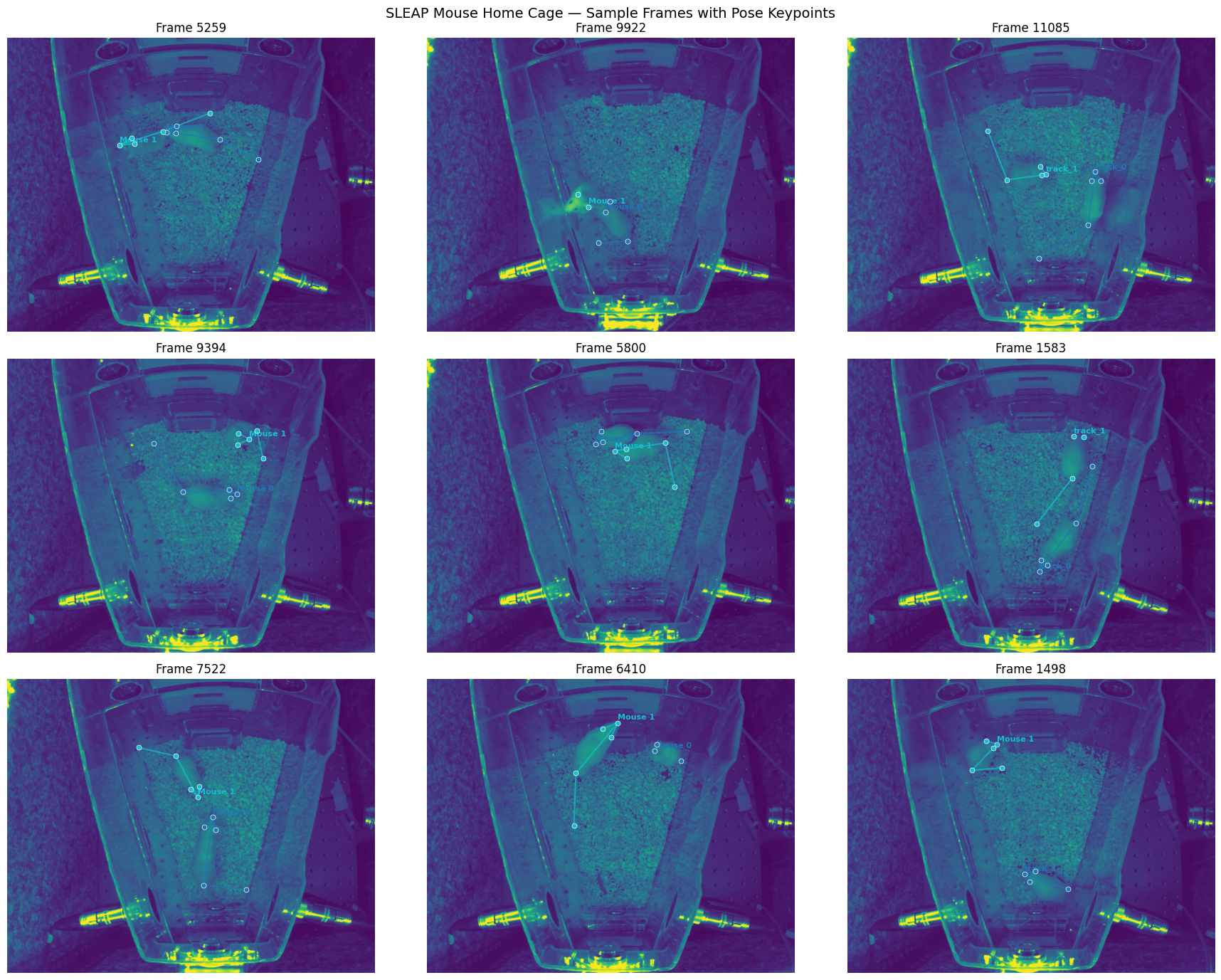
4. Export frames as images + annotations summary
Save individual frames as PNGs and build a summary of the annotations for downstream VQA data generation.
data_dirPosixPath('data')import json
from PIL import Image
frames_dir = data_dir / "frames"
frames_dir.mkdir(exist_ok=True)
# Check the shape of the video frames
sample_img = labels.labeled_frames[0].video[labels.labeled_frames[0].frame_idx]
print(f"Raw frame shape: {sample_img.shape}, dtype: {sample_img.dtype}")
annotations = []
for i, lf in enumerate(labels.labeled_frames):
# Save frame as PNG
img_array = lf.video[lf.frame_idx]
# Squeeze extra dimensions (e.g. (1, H, W, 1) -> (H, W) or (1, H, W, 3) -> (H, W, 3))
img_array = np.squeeze(img_array)
img = Image.fromarray(img_array)
img_path = frames_dir / f"frame_{i:04d}.png"
img.save(img_path)
# Build annotation record
instances_data = []
for inst in lf.instances:
pts = inst.numpy() # (n_nodes, 2)
keypoints = {}
for node, pt in zip(skeleton.nodes, pts):
if not np.isnan(pt[0]):
keypoints[node.name] = {"x": round(float(pt[0]), 1), "y": round(float(pt[1]), 1)}
instances_data.append({
"track": inst.track.name if inst.track else None,
"keypoints": keypoints,
})
annotations.append({
"frame_id": i,
"frame_idx": lf.frame_idx,
"image_path": str(img_path),
"num_mice": len(lf.instances),
"instances": instances_data,
})
# Save annotations
ann_path = data_dir / "annotations.json"
with open(ann_path, "w") as f:
json.dump(annotations, f, indent=2)
print(f"Exported {len(annotations)} frames to {frames_dir}")
print(f"Annotations saved to {ann_path}")
print(f"\nSample annotation:")
print(json.dumps(annotations[0], indent=2))Raw frame shape: (1024, 1280, 1), dtype: uint8
Exported 1178 frames to data/frames
Annotations saved to data/annotations.json
Sample annotation:
{
"frame_id": 0,
"frame_idx": 5259,
"image_path": "data/frames/frame_0000.png",
"num_mice": 2,
"instances": [
{
"track": null,
"keypoints": {
"snout": {
"x": 554.0,
"y": 328.0
},
"earL": {
"x": 586.0,
"y": 332.0
},
"earR": {
"x": 590.0,
"y": 306.0
},
"tb": {
"x": 740.0,
"y": 352.0
},
"tt": {
"x": 874.9,
"y": 423.2
}
}
},
{
"track": null,
"keypoints": {
"snout": {
"x": 392.0,
"y": 372.0
},
"earL": {
"x": 444.1,
"y": 367.4
},
"earR": {
"x": 433.1,
"y": 347.6
},
"tb": {
"x": 541.8,
"y": 324.9
},
"tt": {
"x": 705.1,
"y": 262.4
}
}
}
]
}6. Generate VQA training pairs from annotations
We programmatically create question-answer pairs from the keypoint data. The goal is to teach the VLM domain-specific vocabulary and spatial precision — things like body part names, posture descriptions, inter-mouse distances, and occlusion awareness.
Question categories: 1. Counting — “How many mice are in this frame?” 2. Localization — “Where is Mouse A’s snout?” 3. Body part visibility — “Which body parts are visible/occluded?” 4. Posture — computed from snout-to-tail geometry 5. Spatial relationships — inter-mouse distance, relative positions 6. Orientation — which direction is the mouse facing?
import random

# Readable names for body parts
PART_NAMES = {
    "snout": "snout",
    "earL": "left ear",
    "earR": "right ear",
    "tb": "tail base",
    "tt": "tail tip",
}

# Image dimensions (from our earlier inspection)
IMG_W, IMG_H = 1280, 1024

def get_centroid(kps):
    """Get the centroid of all visible keypoints."""
    xs = [v["x"] for v in kps.values()]
    ys = [v["y"] for v in kps.values()]
    return np.mean(xs), np.mean(ys)

def get_spatial_label(kps, all_centroids):
    """Generate a natural spatial description for a mouse based on its position.

    For single-mouse frames: 'the mouse'
    For multi-mouse frames: uses relative position like 'the mouse on the left',
    'the mouse near the top-right', etc.
    """
    if len(all_centroids) == 1:
        return "the mouse"

    cx, cy = get_centroid(kps)

    # Determine horizontal position
    x_frac = cx / IMG_W
    if x_frac < 0.33:
        h_pos = "left"
    elif x_frac > 0.66:
        h_pos = "right"
    else:
        h_pos = "center"

    # Determine vertical position
    y_frac = cy / IMG_H
    if y_frac < 0.33:
        v_pos = "top"
    elif y_frac > 0.66:
        v_pos = "bottom"
    else:
        v_pos = "middle"

    # Combine into a natural label
    if v_pos == "middle" and h_pos == "center":
        # Fall back to relative comparison with other mice
        other_cx = [c[0] for c in all_centroids if c != (cx, cy)]
        if other_cx and cx < min(other_cx):
            return "the mouse on the left"
        elif other_cx and cx > max(other_cx):
            return "the mouse on the right"
        return "the mouse in the center"
    elif v_pos == "middle":
        return f"the mouse on the {h_pos}"
    elif h_pos == "center":
        return f"the mouse near the {v_pos}"
    else:
        return f"the mouse near the {v_pos}-{h_pos}"

def get_body_length(kps):
    """Euclidean distance from snout to tail tip (if both visible)."""
    if "snout" in kps and "tt" in kps:
        dx = kps["tt"]["x"] - kps["snout"]["x"]
        dy = kps["tt"]["y"] - kps["snout"]["y"]
        return np.sqrt(dx**2 + dy**2)
    return None

def get_heading(kps):
    """Direction mouse is facing based on snout → tail base vector (reversed)."""
    if "snout" in kps and "tb" in kps:
        dx = kps["snout"]["x"] - kps["tb"]["x"]
        dy = kps["snout"]["y"] - kps["tb"]["y"]
        angle = np.degrees(np.arctan2(-dy, dx))  # image y is inverted
        if -45 <= angle < 45:
            return "right"
        elif 45 <= angle < 135:
            return "upward"
        elif -135 <= angle < -45:
            return "downward"
        else:
            return "left"
    return None

def get_posture(kps):
    """Estimate posture from keypoint geometry."""
    length = get_body_length(kps)
    if length is None:
        return None
    if "snout" in kps and "tb" in kps:
        dx = kps["tb"]["x"] - kps["snout"]["x"]
        dy = kps["tb"]["y"] - kps["snout"]["y"]
        body_len = np.sqrt(dx**2 + dy**2)
        ratio = body_len / length if length > 0 else 0
        if ratio < 0.45:
            return "curled up"
        elif ratio < 0.65:
            return "hunched"
        else:
            return "stretched or locomoting"
    return None

print("Helper functions defined.")
Helper functions defined.def generate_qa_pairs(ann):
"""Generate multiple VQA pairs from a single frame annotation."""
qa_pairs = []
instances = ann["instances"]
num_mice = ann["num_mice"]
# Pre-compute centroids and spatial labels for all mice
all_centroids = []
for inst in instances:
kps = inst["keypoints"]
if kps:
all_centroids.append(get_centroid(kps))
else:
all_centroids.append((0, 0))
labels = []
for inst in instances:
kps = inst["keypoints"]
if kps:
labels.append(get_spatial_label(kps, all_centroids))
else:
labels.append("a mouse")
# --- 1. Counting ---
qa_pairs.append({
"question": "How many mice are visible in this image?",
"answer": f"There {'is' if num_mice == 1 else 'are'} {num_mice} {'mouse' if num_mice == 1 else 'mice'} visible in this image."
})
# --- 2. Localization (per mouse) ---
for i, inst in enumerate(instances):
kps = inst["keypoints"]
label = labels[i]
if len(kps) == 0:
continue
cx, cy = get_centroid(kps)
qa_pairs.append({
"question": f"Where is {label} located in the image?",
"answer": f"{label.capitalize()} is centered at approximately ({cx:.0f}, {cy:.0f}) in pixel coordinates."
})
# Specific body part location (pick a random visible one)
part = random.choice(list(kps.keys()))
readable = PART_NAMES[part]
qa_pairs.append({
"question": f"Where is the {readable} of {label}?",
"answer": f"The {readable} of {label} is at pixel coordinates ({kps[part]['x']:.0f}, {kps[part]['y']:.0f})."
})
# --- 3. Body part visibility ---
for i, inst in enumerate(instances):
kps = inst["keypoints"]
label = labels[i]
visible = [PART_NAMES[k] for k in kps.keys()]
all_parts = set(PART_NAMES.keys())
occluded = [PART_NAMES[k] for k in all_parts - set(kps.keys())]
if occluded:
qa_pairs.append({
"question": f"Which body parts of {label} are occluded or not visible?",
"answer": f"The following body parts of {label} are not visible: {', '.join(occluded)}. "
f"Visible parts are: {', '.join(visible)}."
})
else:
qa_pairs.append({
"question": f"Are all body parts of {label} visible?",
"answer": f"Yes, all tracked body parts of {label} are visible: {', '.join(visible)}."
})
# --- 4. Posture ---
for i, inst in enumerate(instances):
kps = inst["keypoints"]
label = labels[i]
posture = get_posture(kps)
if posture:
length = get_body_length(kps)
qa_pairs.append({
"question": f"Describe the posture of {label}.",
"answer": f"{label.capitalize()} appears to be {posture}. "
f"The snout-to-tail-tip distance is approximately {length:.0f} pixels."
})
# --- 5. Orientation ---
for i, inst in enumerate(instances):
kps = inst["keypoints"]
label = labels[i]
heading = get_heading(kps)
if heading:
qa_pairs.append({
"question": f"Which direction is {label} facing?",
"answer": f"{label.capitalize()} is facing {heading}, based on the snout-to-tail-base axis."
})
# --- 6. Spatial relationships (if 2+ mice) ---
if num_mice >= 2:
for i in range(len(instances)):
for j in range(i + 1, len(instances)):
kps_i = instances[i]["keypoints"]
kps_j = instances[j]["keypoints"]
if "snout" in kps_i and "snout" in kps_j:
dx = kps_i["snout"]["x"] - kps_j["snout"]["x"]
dy = kps_i["snout"]["y"] - kps_j["snout"]["y"]
dist = np.sqrt(dx**2 + dy**2)
label_i, label_j = labels[i], labels[j]
proximity = "close together (possible social interaction)" if dist < 150 else \
"at moderate distance" if dist < 400 else "far apart"
qa_pairs.append({
"question": f"How far apart are the two mice?",
"answer": f"The snout-to-snout distance between {label_i} and {label_j} "
f"is approximately {dist:.0f} pixels. They are {proximity}."
})
return qa_pairs
# Generate for all frames
random.seed(42)
all_vqa = []
for ann in annotations:
pairs = generate_qa_pairs(ann)
for qa in pairs:
all_vqa.append({
"image": ann["image_path"],
"frame_id": ann["frame_id"],
"question": qa["question"],
"answer": qa["answer"],
})
print(f"Generated {len(all_vqa)} VQA pairs from {len(annotations)} frames")
print(f"Average {len(all_vqa)/len(annotations):.1f} questions per frame")Generated 12987 VQA pairs from 1178 frames
Average 11.0 questions per frame# Preview some examples
random.seed(42)
samples = random.sample(all_vqa, 10)
for s in samples:
print(f"[Frame {s['frame_id']}]")
print(f" Q: {s['question']}")
print(f" A: {s['answer']}")
print()[Frame 950]
Q: Which direction is the mouse near the top facing?
A: The mouse near the top is facing right, based on the snout-to-tail-base axis.
[Frame 166]
Q: Where is the mouse near the bottom located in the image?
A: The mouse near the bottom is centered at approximately (616, 802) in pixel coordinates.
[Frame 37]
Q: Which direction is the mouse near the bottom facing?
A: The mouse near the bottom is facing left, based on the snout-to-tail-base axis.
[Frame 1102]
Q: How many mice are visible in this image?
A: There are 2 mice visible in this image.
[Frame 410]
Q: How far apart are the two mice?
A: The snout-to-snout distance between the mouse near the top and the mouse near the top is approximately 168 pixels. They are at moderate distance.
[Frame 367]
Q: Where is the left ear of the mouse near the bottom?
A: The left ear of the mouse near the bottom is at pixel coordinates (784, 853).
[Frame 335]
Q: Are all body parts of the mouse near the top visible?
A: Yes, all tracked body parts of the mouse near the top are visible: snout, left ear, right ear, tail base, tail tip.
[Frame 209]
Q: Which direction is the mouse on the left facing?
A: The mouse on the left is facing downward, based on the snout-to-tail-base axis.
[Frame 1094]
Q: Are all body parts of the mouse near the top visible?
A: Yes, all tracked body parts of the mouse near the top are visible: snout, left ear, right ear, tail base, tail tip.
[Frame 153]
Q: Where is the snout of the mouse on the left?
A: The snout of the mouse on the left is at pixel coordinates (600, 506).
7. Save VQA dataset and train/val split
# Split by frame (not by QA pair) to avoid data leakage
frame_ids = list(set(s["frame_id"] for s in all_vqa))
random.seed(42)
random.shuffle(frame_ids)

split_idx = int(0.85 * len(frame_ids))
train_frames = set(frame_ids[:split_idx])
val_frames = set(frame_ids[split_idx:])

train_vqa = [s for s in all_vqa if s["frame_id"] in train_frames]
val_vqa = [s for s in all_vqa if s["frame_id"] in val_frames]

print(f"Train: {len(train_vqa)} QA pairs ({len(train_frames)} frames)")
print(f"Val:   {len(val_vqa)} QA pairs ({len(val_frames)} frames)")

# Save
vqa_dir = data_dir / "vqa"
vqa_dir.mkdir(exist_ok=True)

with open(vqa_dir / "train.json", "w") as f:
    json.dump(train_vqa, f, indent=2)

with open(vqa_dir / "val.json", "w") as f:
    json.dump(val_vqa, f, indent=2)

# Also save the full dataset
with open(vqa_dir / "all.json", "w") as f:
    json.dump(all_vqa, f, indent=2)

print(f"\nSaved to {vqa_dir}/")

# Question type distribution
from collections import Counter
q_types = []
for s in all_vqa:
    q = s["question"]
    if "How many" in q:
        q_types.append("counting")
    elif "Where is Mouse" in q and "located" in q:
        q_types.append("mouse location")
    elif "Where is the" in q:
        q_types.append("body part location")
    elif "occluded" in q or "visible" in q:
        q_types.append("visibility")
    elif "posture" in q:
        q_types.append("posture")
    elif "direction" in q:
        q_types.append("orientation")
    elif "far apart" in q:
        q_types.append("spatial relationship")
    else:
        q_types.append("other")

counts = Counter(q_types)
print("\nQuestion type distribution:")
for qtype, count in counts.most_common():
    print(f"  {qtype:>25s}: {count:5d} ({count/len(all_vqa)*100:.1f}%)")
Train: 11011 QA pairs (1001 frames)
Val: 1976 QA pairs (177 frames)
Saved to data/vqa/
Question type distribution:
body part location: 4712 (36.3%)
visibility: 2356 (18.1%)
orientation: 2003 (15.4%)
posture: 1831 (14.1%)
counting: 1178 (9.1%)
spatial relationship: 907 (7.0%)